

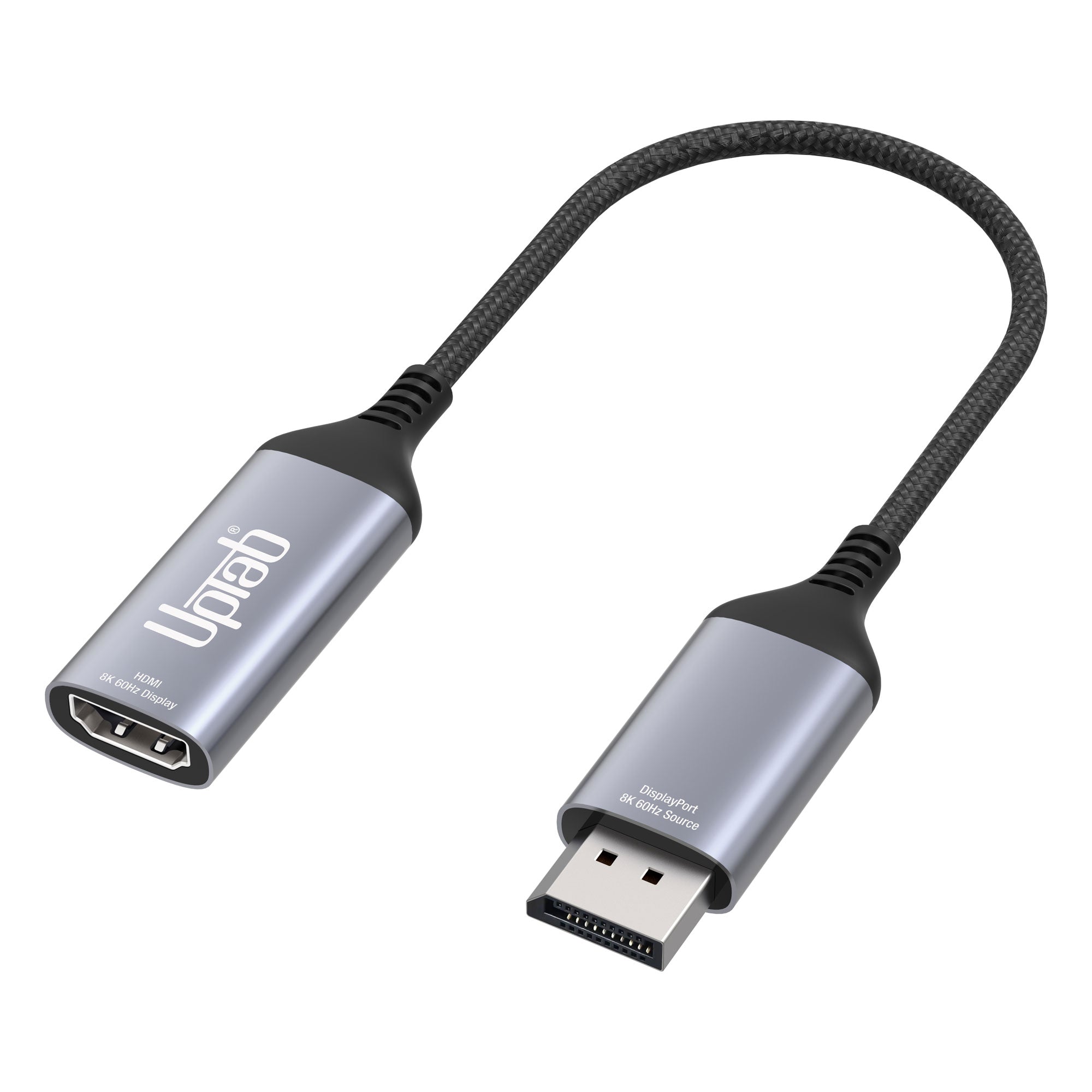
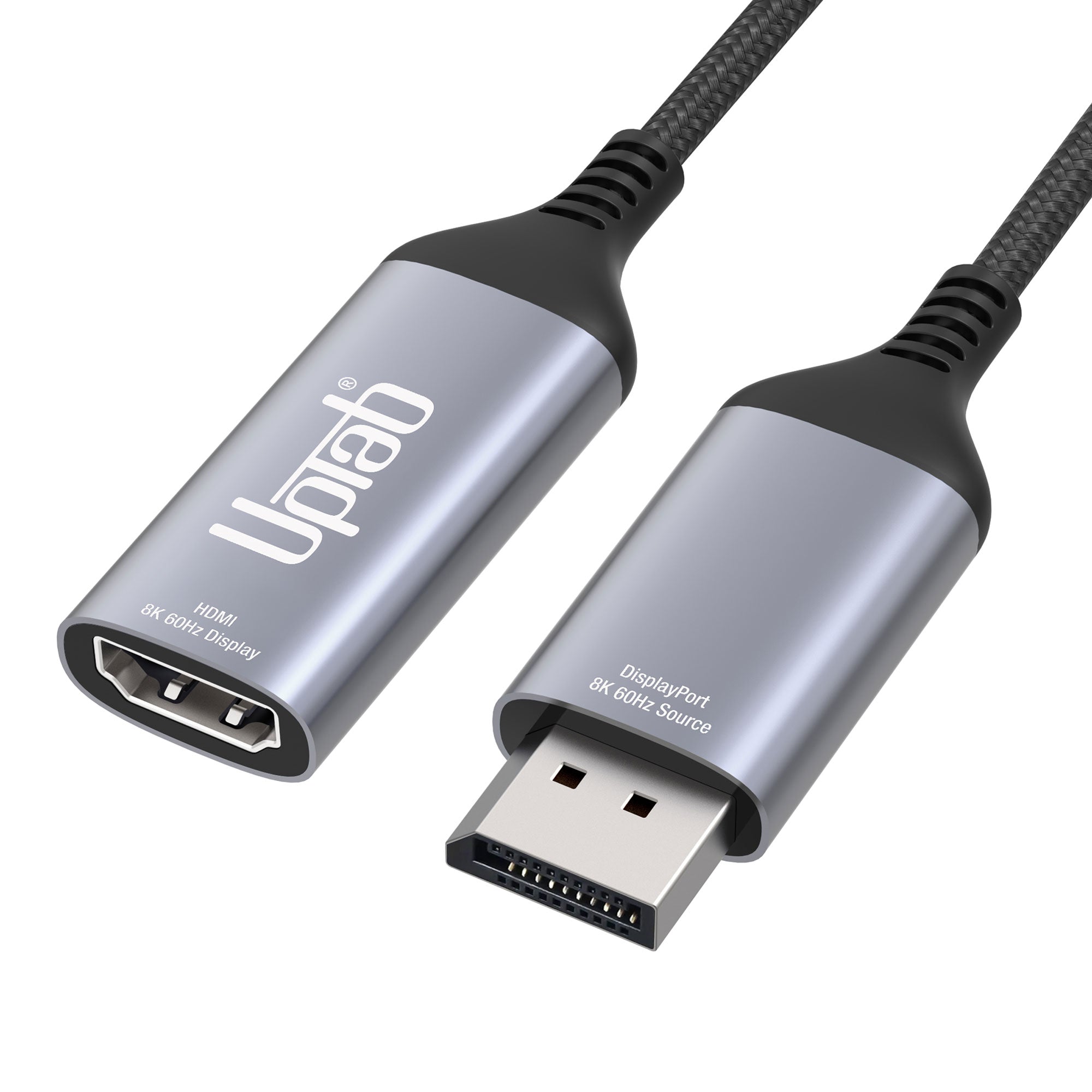
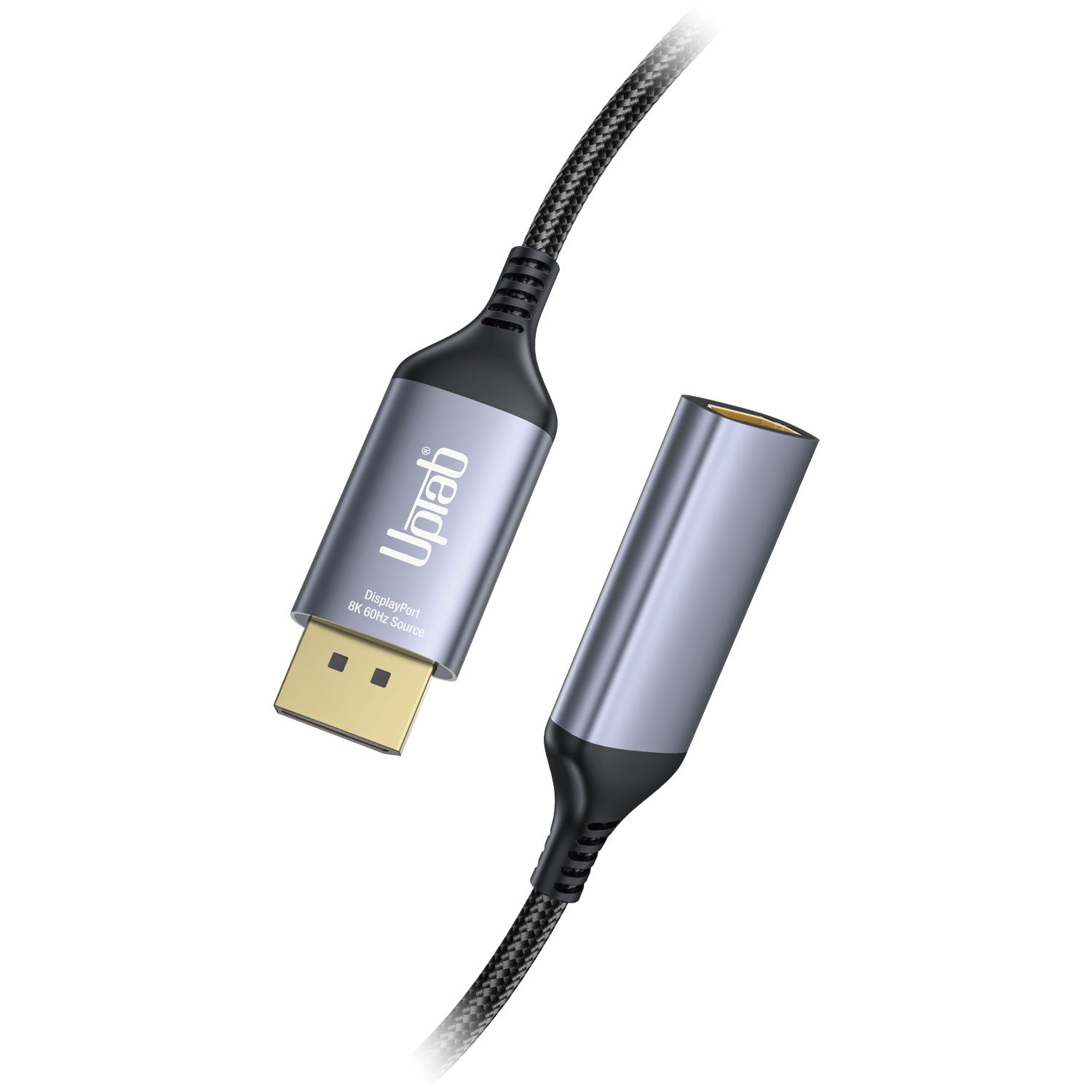
DisplayPort 1.4 auf HDMI 2.1 8K 60Hz HDR Aktivadapter
Über diesen Artikel
Passt gut zu
VERSAND AM SELBEN TAG, Bestellung bis 11:00 Uhr (EST)
Kostenloser Versand für Bestellungen über 50 $
Technischer Support
30 Tage Rückgaberecht
1 Jahr Garantie
DisplayPort 1.4 auf HDMI 2.1 8K 60Hz HDR Aktivadapter
Produktdetails
Verbinden Sie Ihren Computer mit DisplayPort über den DisplayPort Active Adapter mit einem HDMI Ultra HD-Display mit High Dynamic Range (HDR)! Dieser Adapter wurde speziell für anspruchsvolle Nutzer von Computern, Grafikprogrammen und Spielen entwickelt. HDMI 2.1 mit bis zu 48 Gbit/s ermöglicht selbst flüssige 8K-Videowiedergabe, insbesondere in Kombination mit einer Bildwiederholfrequenz von 60 Hz und HDR. So entstehen lebensechte Farben und Bewegungen für ein ultimatives Seherlebnis. Der Adapter wandelt DisplayPort-Videosignale in bis zu 8K (7680 × 4320 bei 60 Hz mit DSC) oder 4K (4096 × 2160 bei 120 Hz mit DSC) um, inklusive 1440p bei 240 Hz. Dank seiner kompakten Größe ist der DisplayPort Active Adapter besonders benutzerfreundlich und ideal für unterwegs. Er benötigt keine externe Stromversorgung.
Nicht zuletzt unterstützt der DisplayPort Active Adapter das 4:4:4-Farbformat und sorgt so für lebendige RGB-Farben sowie HDR ohne die üblichen Farbverfälschungen. Auch der Ton lässt keine Wünsche offen: Bis zu 8-Kanal-Audio wird für ein immersives Klangerlebnis übertragen.
* Bitte aktualisieren Sie Ihre TV-Firmware auf die Version, die diese Auflösungen/Bildwiederholraten unterstützt!
** Bitte aktualisieren Sie die Grafiktreiber Ihres PCs und stellen Sie sicher, dass DSC 1.2 auf Ihren Geräten unterstützt wird, um diese Auflösungen/Bildwiederholraten zu ermöglichen!
Dieses Produkt ist SPEZIELL für die Verwendung mit den neuesten Grafikprozessoren (GPUs) konzipiert, die DSC 1.2 unterstützen. Zum Zeitpunkt der Veröffentlichung sind dies die unterstützten GPUs:
NVIDIA RTX: TITAN RTX, RTX 2060, RTX 2070, RTX 2080, RTX 3060, RTX 3080, RTX 3090, RTX 4090, RTX 4080
AMD Radeon: RX 6000, RX 7900 XTX
QUADRO: RTX8000, RTX6000, RTX5000, RTX4000, RTX3000 MOBIL
Intel 11/12-basierte Generation: Alder Lake, Tiger Lake, Ice Lake, Iris Plus Graphics, UHD Graphics
Höhepunkte:
- Ideal für Gamer und andere anspruchsvolle Computeranforderungen
- Unterstützt das 4:4:4-Farbformat mit klaren RGB-Farben
- Audio zu 8-Kanal-Audio
- HDMI 2.1 durchgehend bis zu 48 Gbit/s
- Kleines, tragbares Design
- Mehrfach geschirmtes Kabel mit Aluminiumgehäuse
- Konvertiert DisplayPort-Videosignale mit bis zu UHD 8K 7680×4320@60Hz oder 4K 4096x2160@120Hz, einschließlich 1440p bei 120Hz
Allgemein:
- VESA DisplayPort (DP) v1.4-kompatibler Empfänger
- Sender gemäß HDMI-Spezifikation v2.1, Datenrate bis zu 12 Gbit/s pro Kanal im FRL-Modus und bis zu 6 Gbit/s im TMDS-Modus.
- Eingebettete MCU
- Eingebettete EDID. Antwort auf EDID, wenn das Endgerät es nicht hat
- Unterstützt sowohl HDCP1.4 als auch HDCP2.3 mit On-Chip-Schlüsseln zur Unterstützung des HDCP-Repeaters.
- Unterstützt RGB 4:4:4 8/10-Bit bpc und YCbCr 4:4:4, 4:2:2, 4:2:0 8/10-Bit bpc
- Unterstützt DSC v1.2a-Decoder und Pass-Through-Modus
- Unterstützt max. Auflösung/Timing bis zu 8K@60p / 4K@120Hz
- Unterstützt den Transport von 3D-Stereo-Videoformaten
- Unterstützt die Farbraumkonvertierung
- Unterstützt das LPCM-Audioformat mit einer maximalen Audio-Abtastrate von bis zu 8 Kanälen und 192 kHz
- Unterstützt HBR-Audioformat bis zu 2-Kanal 768 KHz
- Unterstützt 3D-Audioformate bis zu 16 Kanälen bei 96 kHz
- Unterstützt CEC über den AUX-Kanal
- Unterstützt High Dynamic Range (HDR-10)
- Unterstützt VESA Monitor Control Command Set (MCCS)
- Unterstützt CEC über den AUX-Kanal
- Betriebstemperatur bis zu 70 °C/158 °F
Technische Spezifikationen:
- Eingang: DisplayPort (DP) v1.4-kompatibel
- Unterstützt 1/2/4 Lanes bis zu HBR3 (8,1 Gbit/s) Eingang
- Eingebauter leistungsstarker adaptiver Equalizer
- Unterstützt 1-MHz-AUX-Kanal
- Unterstützt DSC v1.2a und ist abwärtskompatibel mit früheren Versionen
- Unterstützt DSC-Decoder und Pass-Through-Modus
- Unterstützt max. Auflösung/Timing bis zu 8K@60p / 4K@120Hz
- Unterstützt CEC über den AUX-Kanal
- Unterstützt das LPCM-Audioformat mit einer maximalen Audio-Abtastrate von bis zu 8 Kanälen und 192 kHz
- Unterstützt HBR-Audioformat bis zu 2-Kanal 768 KHz
- Unterstützt 3D-Audioformate bis zu 16 Kanälen bei 96 kHz
- Ausgabe: HDMI 2.1 Buchse; ein ultraschnelles HDMI 2.1 Kabel (separat erhältlich) ist erforderlich
- Unterstützt maximale Auflösung/Timing bis zu 8K@60p / 4K@120Hz mit DSC
- HDMI 2.1-kompatibler Sender, Datenrate bis zu 12 Gbit/s im FRL-Modus pro Kanal und bis zu 6 Gbit/s im TMDS-Modus.
- LPCM- und Compressed Audio-Kodierungsformate
- Unterstützt das LPCM-Audioformat mit einer maximalen Audio-Abtastrate von bis zu 8 Kanälen und 192 kHz
- Unterstützt HBR-Audioformat bis zu 2-Kanal 768 KHz
- Unterstützt 3D-Audioformate mit bis zu 16 Kanälen und 96 kHz. Unterstützt DSC v1.2a und ist abwärtskompatibel mit der vorherigen Version.
- Unterstützt den DSC-Passthrough-Modus
- Handhabung des Audiostreams
Lieferumfang:
- 1x UPTab DisplayPort 1.4 auf HDMI 2.1 4K/120Hz HDR Aktivadapter
- 1 Jahr Garantie
Hier ist eine Kurzanleitung zur Verwendung dieses Adapters:
- Schließen Sie das DisplayPort-Ende des Adapters an Ihren Computer oder ein anderes Gerät an. Stellen Sie sicher, dass die Verbindung sicher ist.
- Schließen Sie das HDMI-Ende des Adapters an Ihren Fernseher oder Monitor an. Stellen Sie sicher, dass die Verbindung sicher ist.
- Schalten Sie Ihren Fernseher oder Monitor ein und stellen Sie ihn auf den richtigen HDMI-Eingang ein.
- Stellen Sie sicher, dass die Auflösung und Bildwiederholfrequenz Ihres Computers oder Geräts mit denen des Fernsehers oder Monitors übereinstimmen.
- Überprüfen Sie, ob Ihr Gerät HDR unterstützt. Wenn ja, sollten Sie es in den Einstellungen aktivieren.
- Genießen Sie Ihre Inhalte mit hoher Auflösung und hoher Bildwiederholrate.
PDF-Datenblatt herunterladen: Hier
F: Mit dem UPTab Active-Adapter erhalte ich nur 4K bei 60 Hz. Wie kann ich 4K bei 120 Hz erreichen?
Es gibt verschiedene Gründe, warum ein 4K-Display mit unserem Adapter auf 4K@30/60Hz begrenzt ist. Wir empfehlen, zunächst Folgendes zu prüfen:
- Der DisplayPort-Ausgang muss DP 1.4-kompatibel sein, um 4K bei 120 Hz mit HDR zu erhalten.
- Systemanforderungen, um sicherzustellen, dass der interne Grafikprozessor 4K bei 60 Hz unterstützt und dass der Ausgangsanschluss am System/GPU 4K bei 60 Hz unterstützt.
- Überprüfen Sie die Monitorspezifikationen, um sicherzustellen, dass der gewünschte Eingangsanschluss 4K bei 120 Hz unterstützt. HDMI-Eingangsanschlüsse müssen HDMI 2.1-kompatibel sein.
- Damit HDR funktioniert, muss das Quellsystem DisplayPort 1.4 unterstützen und der Bildschirm muss HDR und/oder HDMI 2.1 unterstützen.
- Stellen Sie sicher, dass das HDMI-Kabel HDMI 2.1-zertifiziert ist.
Wenn sowohl die GPU des Systems, der DisplayPort-Ausgangsanschluss als auch der Monitor Unterstützung für 4K bei 120 Hz beanspruchen, überprüfen Sie bitte die Einstellungen des erweiterten Anzeigeadapters von Windows, um sicherzustellen, dass 120/60 Hz verfügbar und aus der Dropdown-Liste ausgewählt ist.
Wenn 120 Hz nicht aufgeführt ist und Sie unseren Adapter über ein HDMI 2.1-Kabel angeschlossen haben, überprüfen Sie bitte, ob der Monitor über HDMI 2.1-Anschlüsse verfügt. Darüber hinaus müssen einige 4K-Fernseher und -Monitore die Einstellung „HDMI 2.1“, „HDMI UHD Color“ oder „Ultra HD/UHD Deep Color“ (oder eine ähnliche Einstellung) aktivieren, damit 4K@120/60Hz über HDMI funktioniert. Bitte lesen Sie im Handbuch des Monitors nach und prüfen Sie die Menüeinstellungen des Monitors, ob eine entsprechende Einstellung vorhanden ist.
Der UPTab-Adapter ist wirklich aktiv. Anstatt ein TMDS-Signal über den Dual-Mode von DisplayPort weiterzuleiten, wandeln die Adapter die ausgehenden DisplayPort-LVDS-Pakete aktiv in die erforderlichen TMDS-Signale um. Mit einer internen Taktrate von bis zu 594 MHz unterstützen unsere Adapter alle unverzichtbaren Funktionen von HDMI 2.1, mit Auflösungen bis zu 4K bei 120 Hz mit HDR, stereoskopischer 3D-Unterstützung und höheren Farbtiefen.
F: Unterstützt der UPTab-Adapter (B014E8ZC7E) AMD Eyefinity-Setups mit mehr als zwei Monitoren?
Ja! AMD Eyefinity ermöglicht bis zu zwei herkömmliche Displayanschlüsse (HDMI, DVI oder VGA). Der dritte Anschluss muss ein nativer DisplayPort-Anschluss sein, d. h. kein Dual-Mode/DP++ mit HDMI-Signal (da dieser als einer der beiden herkömmlichen Displays gilt). Bei Verwendung unseres aktiven Adapters muss die Grafikkarte keinen der herkömmlichen Anschlüsse nutzen, sondern spricht ihn als nativen DisplayPort-Anschluss an. (Hinweis: AMD unterstützt maximal zwei aktive Adapter.)
F: Unterstützt der UPTab-Adapter (B014E8ZC7E) 4:4:4-Farb-/Chroma-Sampling?
Ja! Unser Adapter unterstützt 4:4:4-Chroma-Sampling bei 4K @ 120 Hz Auflösung und 8-Bit-Farbtiefe (8bpc). Bitte beachten Sie, dass das angeschlossene Display/Fernsehgerät ebenfalls 4:4:4-Farbtiefe unterstützen muss und das HDMI-Kabel HDMI 2.1-fähig sein muss, wenn es an einen HDMI 2.1-Eingang des Displays angeschlossen wird.
F: Unterstützt Ihr Adapter HDR?
Unser Adapter unterstützt HDR-Bildgebung (High Dynamic Range). HDMI 2.0b ist die Mindestspezifikation für die Unterstützung von HDR.
F: Welche HDR-Standards werden unterstützt?
Unser Adapter unterstützt High Dynamic Range (HDR)-Standards: Dolby Vision HDR, HDR10, HDR10+ und HLG
DATENBLATT:
Wenn Sie Fragen haben, können Sie uns jederzeit gerne kontaktieren. Wir werden uns so schnell wie möglich bei Ihnen melden, werktags innerhalb von 24 Stunden.
-
Versandinformationen
Wir bearbeiten und versenden die meisten Bestellungen noch am selben Tag. Die Lieferzeiten variieren je nach der von Ihnen an der Kasse gewählten Versandart. Bitte stellen Sie sicher, dass Ihre Lieferadresse korrekt ist, um Verzögerungen zu vermeiden.
-
Kundendienst
Unser Team hilft Ihnen gerne weiter! Bei Fragen oder Unterstützung kontaktieren Sie uns per E-Mail oder über unser Kontaktformular. Wir melden uns schnellstmöglich bei Ihnen.
-
FAQs
Wann wird meine Bestellung versendet?
Die meisten Bestellungen werden noch am selben Tag bearbeitet und versendet. Die Lieferzeit hängt von der an der Kasse gewählten Versandoption ab.
Wie sind Ihre Rückgabebedingungen?
Eine Rücksendung der Artikel ist innerhalb von 30 Tagen in der Originalverpackung mit sämtlichem Zubehör möglich. -
Kontaktiere uns
Haben Sie Fragen oder benötigen Sie Hilfe? Wir sind für Sie da.
Der Kundendienst ist von Montag bis Freitag von 9:00 bis 17:00 Uhr (EST) erreichbar.
E-Mail: cs@uptab.com
Telefon: 1 (877) 333-1505
Oder nutzen Sie unser Kontaktformular– wir werden umgehend antworten.
This adapter is my life savings!I bought a TV 40" 4K Samsung at $449 and only could run 30hz through HDMI cable. Purchased this adapter. BAM! Now I can use my TV without any headache or lag at 60hz!p/s: set up your TV to Game mode also.Now I'm having a 4k 40" Ultra HD "monitor" at $500 (total everything.) It's a real deal!
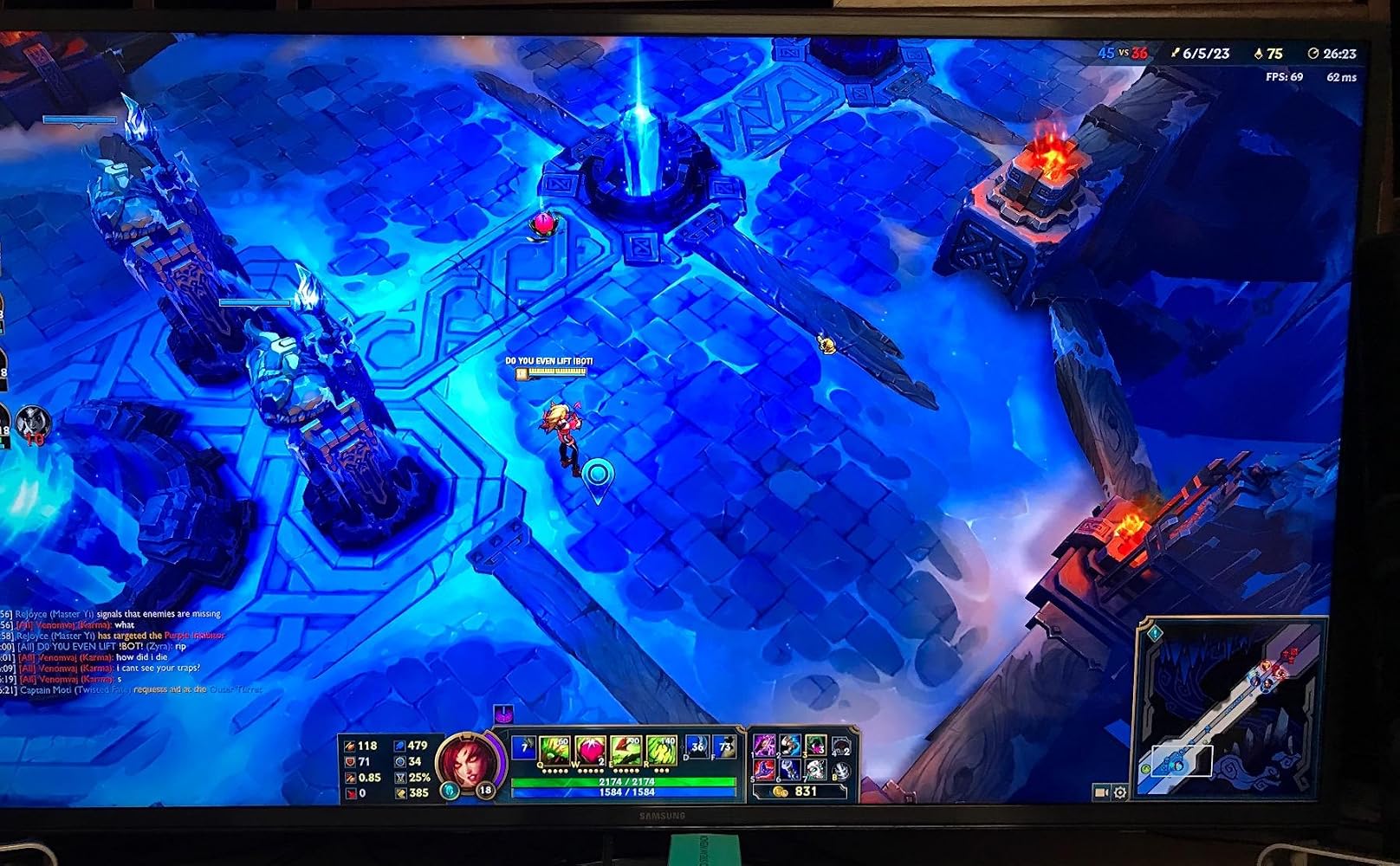
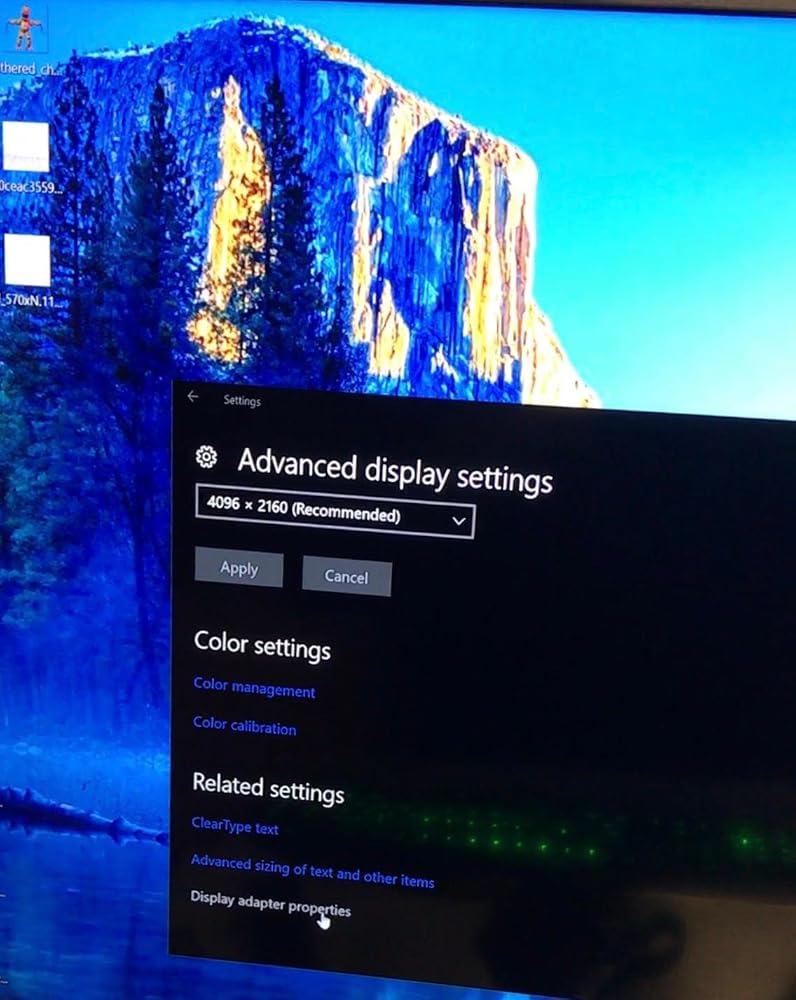
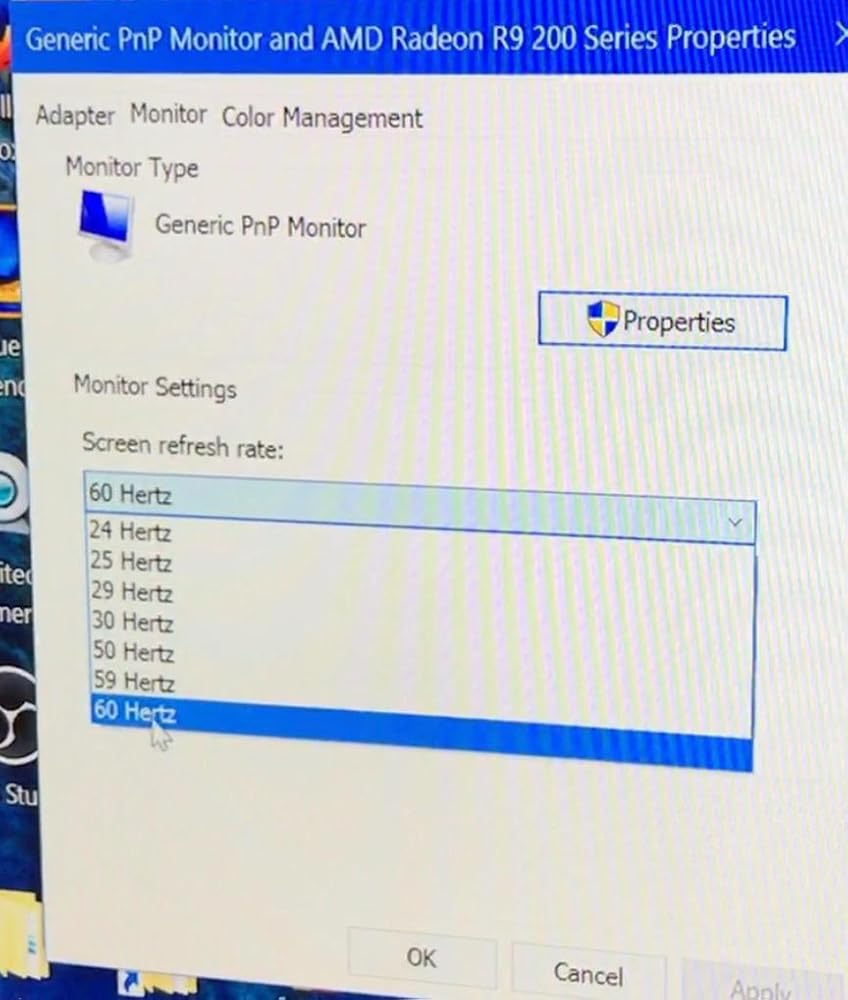
I got 4K60Hz on this converter but No HDR -> No HDMI2.0a. HDCP 2.2 is also not work consistently.My TV: LG OLED65E6PMy HTPC:ASRock Fatal1ty Z270 Gaming-ITX/acCore i5-7500Windows 10 Pro
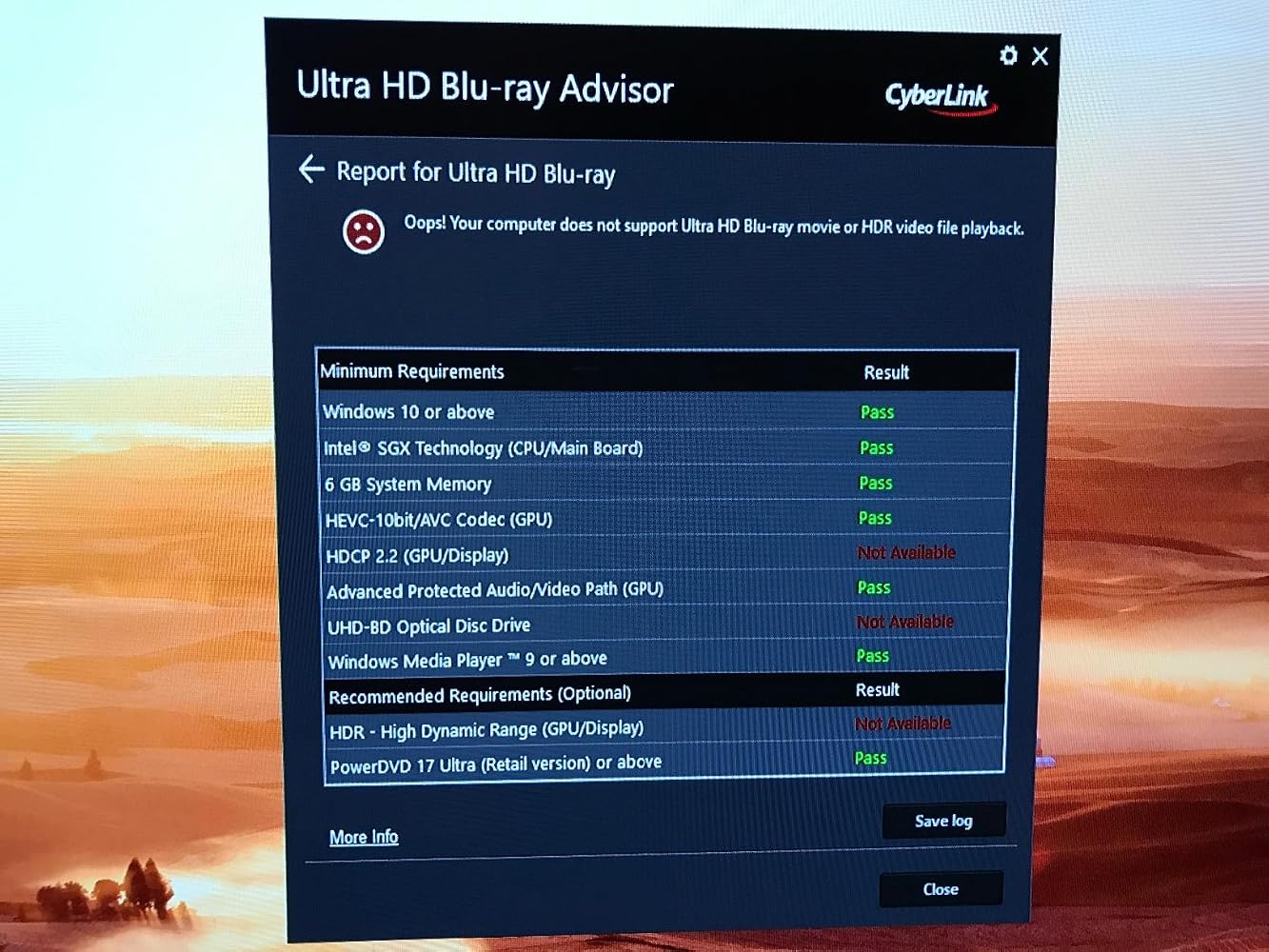
Unfortunately, this product does not work as advertised. I connected the adapter to my R9 290 graphics card, made sure that the HDMI cable that I was using was 2.0 compliant, that the HDMI port on the television was 2.0 compliant, even searched the UPTab website thinking that there might be drivers that I had to download, but with no luck. The highest settings that I have with the adapter are the same as the highest settings that I get without the adapter: 4096x2160@30Hz. I was really crossing my fingers that I'd be able to get 60Hz, since the television itself supports up to 120Hz.
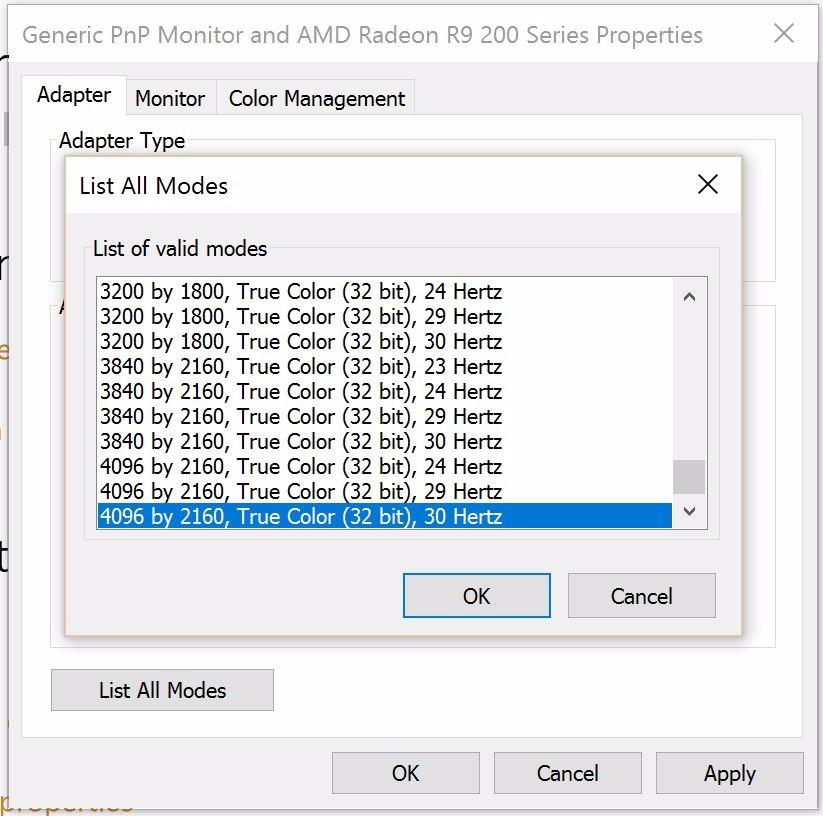
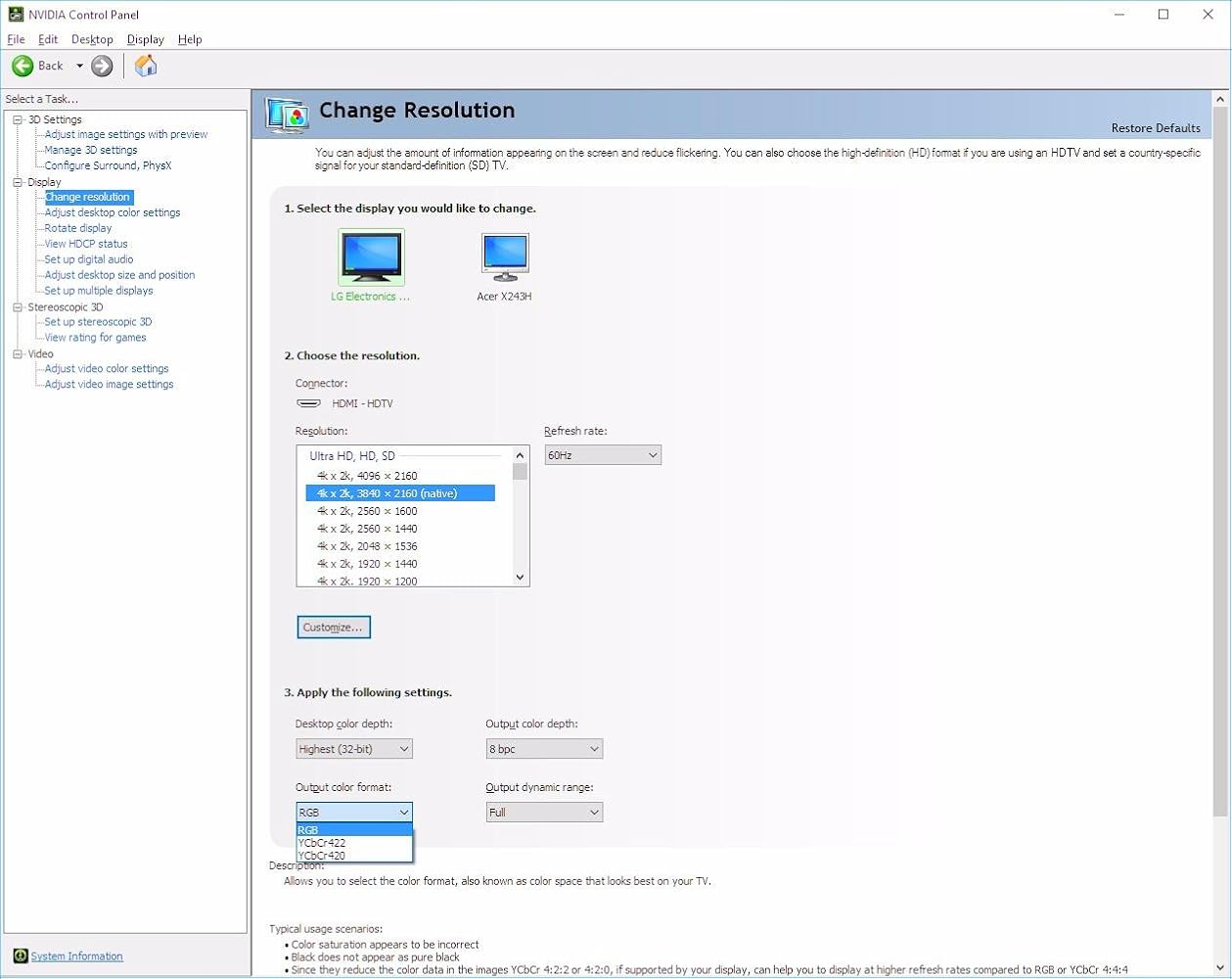
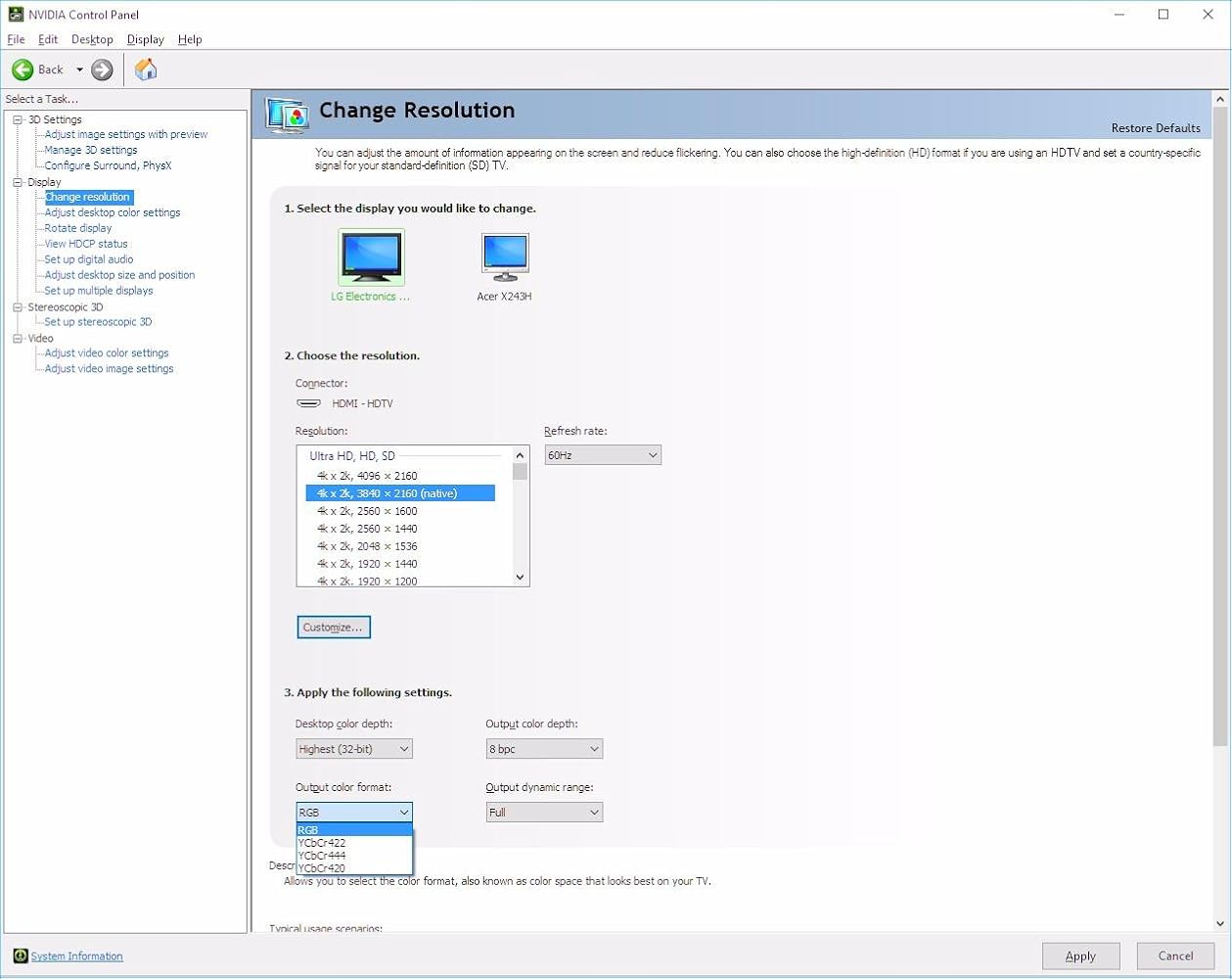
I have an LG 49UB8500 and an NVidia built GTX 1080. Connected directly to the monitor's deep color HDMI port, I get proper 4:4:4 color (see attached screenshot #1). Using this adapter on a displayport to the same input on the screen with the same HDMI cable, I do NOT get 4:4:4 (see attached screenshot).I gave 2 stars instead of 1 because when using RGB, the monitor correctly displays images at 4:4:4 (using test pattern), however, same cable and adapter into a Samsung UN40KU6290 in RGB mode (4:4:4 also doesn't show up for the Samsung) does NOT show 4:4:4 correctly (summarizes to 4:2:2 with test pattern). Connecting to the Samsung screen directly with HDMI from the GTX 1080 shows 4:4:4 like the LG does.
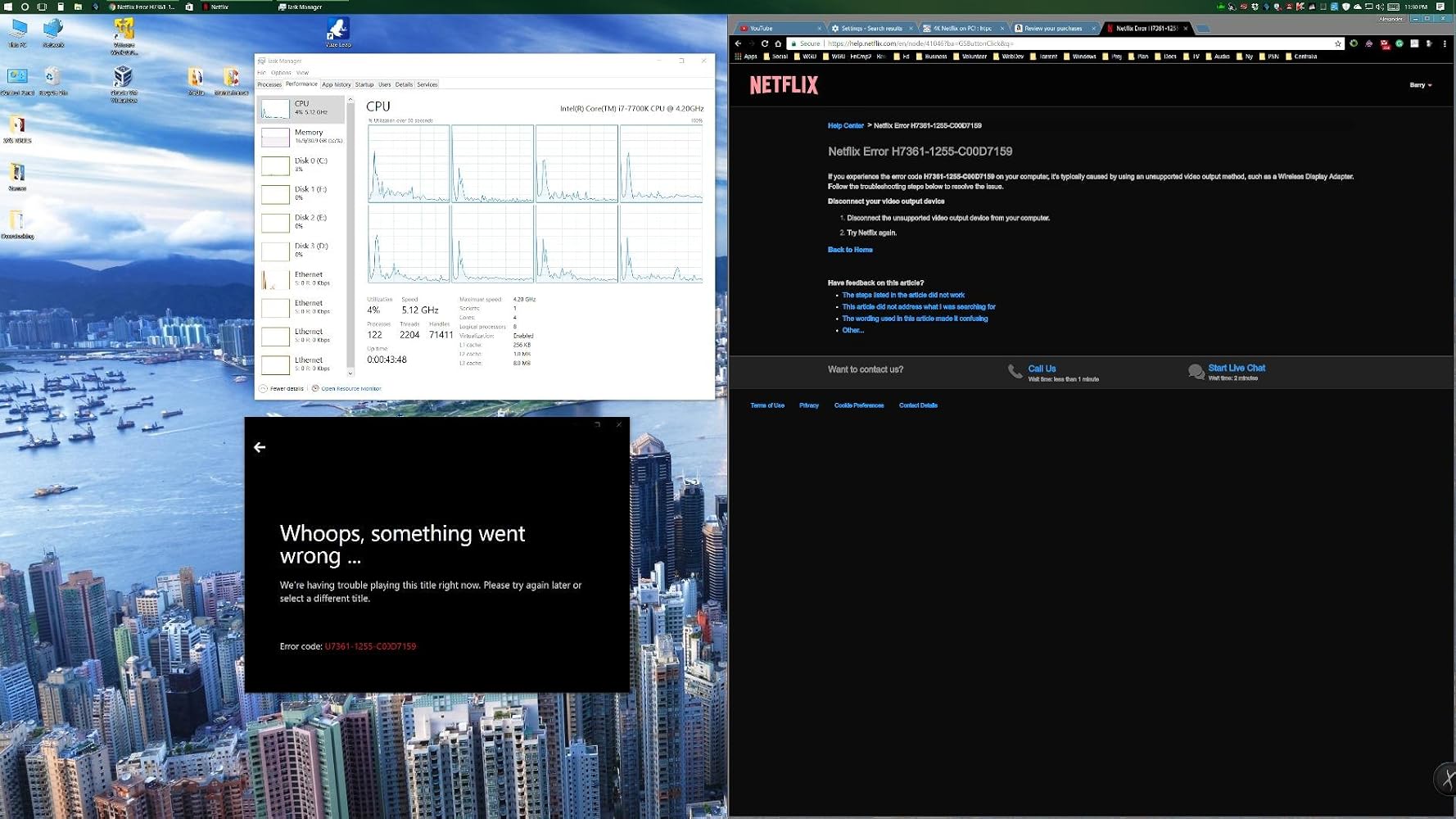
I believe the HDCP 2.2 spec listed is not correct because my adapter does not play Netflix in 4k using this adapter.My PC:----------Asus Maximus Hero IX (z270)32GB DDR4 @ 3000MHzi7-7700k @ 5.2GHz w/ Intel HD 630 Integrated Graphics - DisplayPort 1.2 (max: 4096x2304@60Hz) - HDMI 1.4b (max:3840x2160@30Hz)If I try to view it with the HDMI 1.4b connection to my Samsung 6300 series 2016 4k/hdr10 display, it works, but only at 30Hz (terrible to my eyes, and terrible for gaming, which it why I bought this).When I plug this adapter into the DisplayPort v1.2 and set the resolution to 3840x2160@60p, the desktop works fine, being nice and snappy, but Netflix will not play anything though the adapter, either in the Windows 10 Netflix app, or in the Edge browser!I AM VERY DISAPPOINTED WITH THIS PRODUCT :(
After waiting 3 years for such an adapter to exist and reading the very disappointing reviews of the club 3D one I am happy to report that I am finally able to run my LG OLED TV at it's native resolution and 120Hz. I haven't tried VRR with this adapter but I tried it on a RTX 2080 maxq and on a MacBook pro 16 2019 (with Radeon m5500). I had to use SwitchResX and add a custom resolution to get the Mac output it and I still have a problem of subsampling but I know this adapter can do the job! Great product. It's just sad it didn't exist 3 years ago when the C9 got released

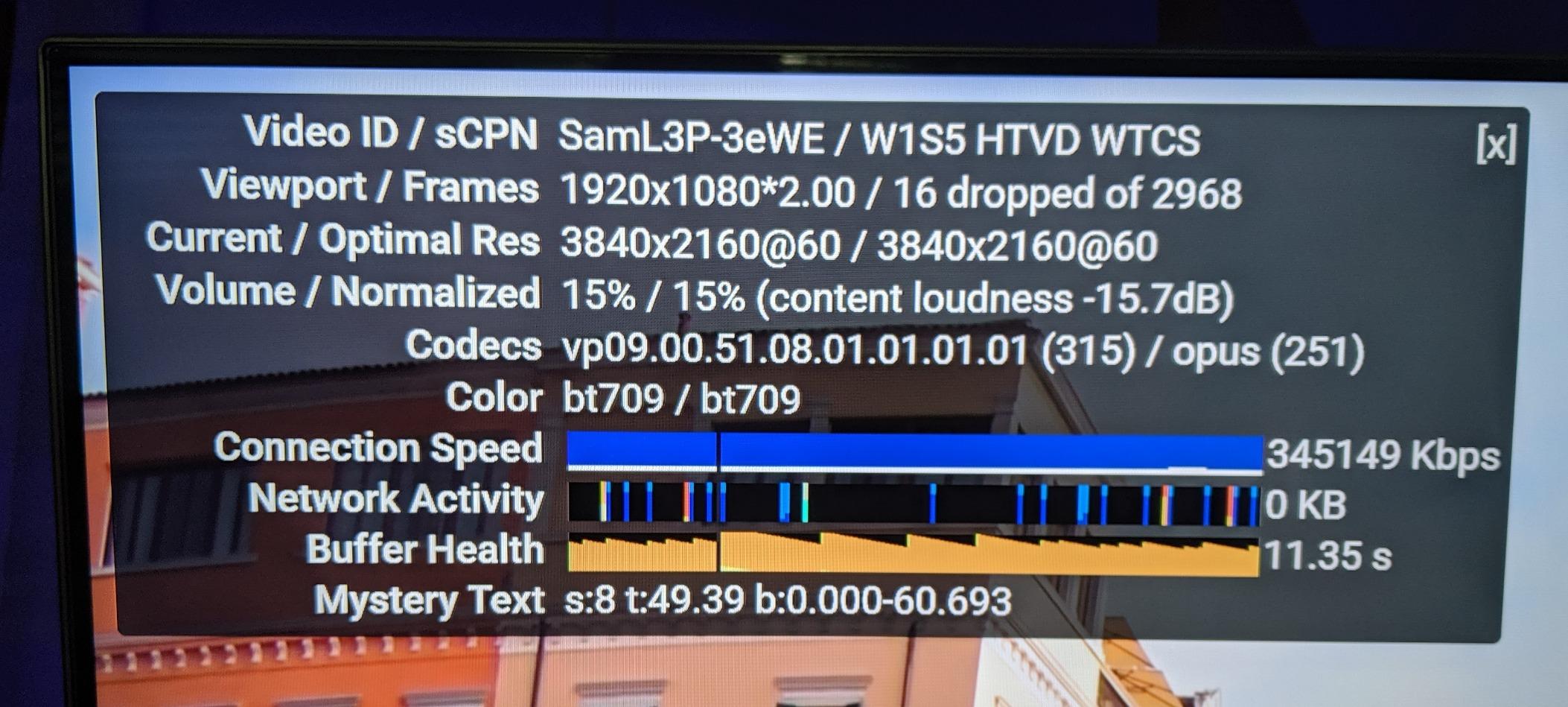
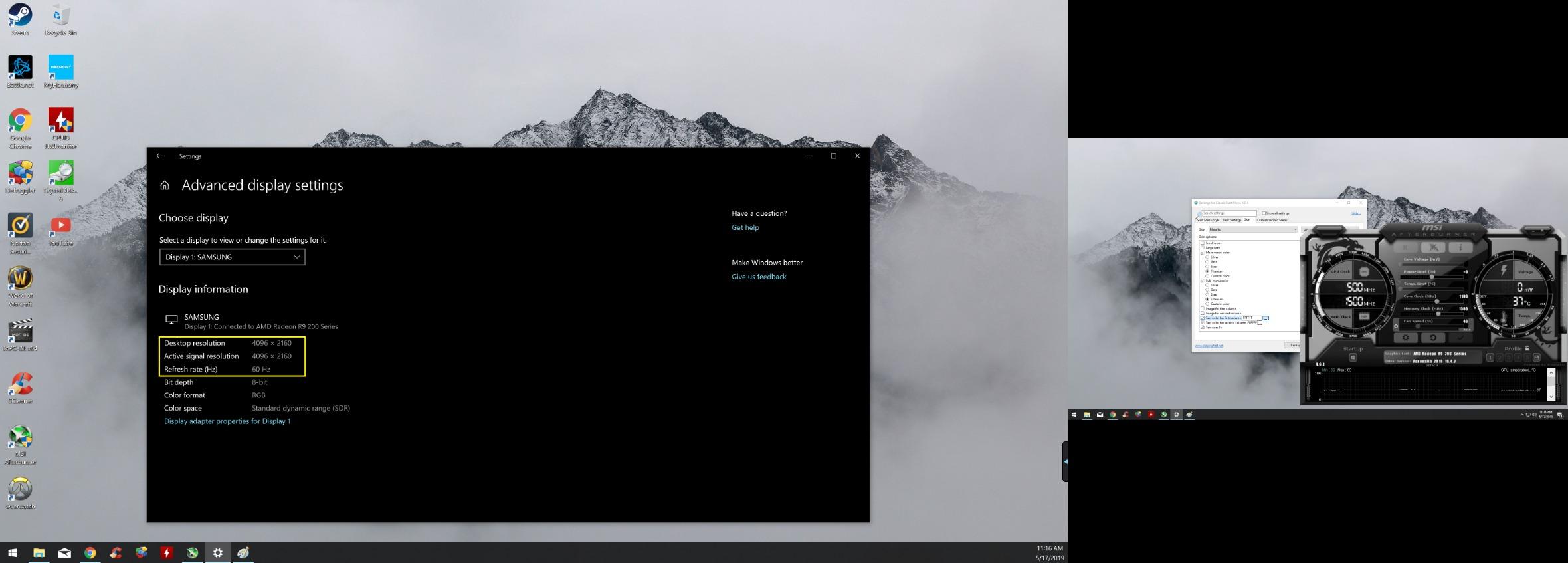
Update: Added second pic of YouTube 4k60fps and it's still cranking it out without dropping frames etcI have an older computer hooked up in my bedroom that has a R9 270 video card in it. Unfortunately the HDMI Port is only capable of 4k 30hz. The Display Port on the other hand could do the 60hz but I am connecting this to a TV, which doesn't have a DP. So I found this and bought it a couple weeks ago. I tested it for a while to make sure it worked.As you can see from the picture this is the case. I used a HDMI cable that was rated for it and it has been solid since. No dropping of signal etc. I hope this helps
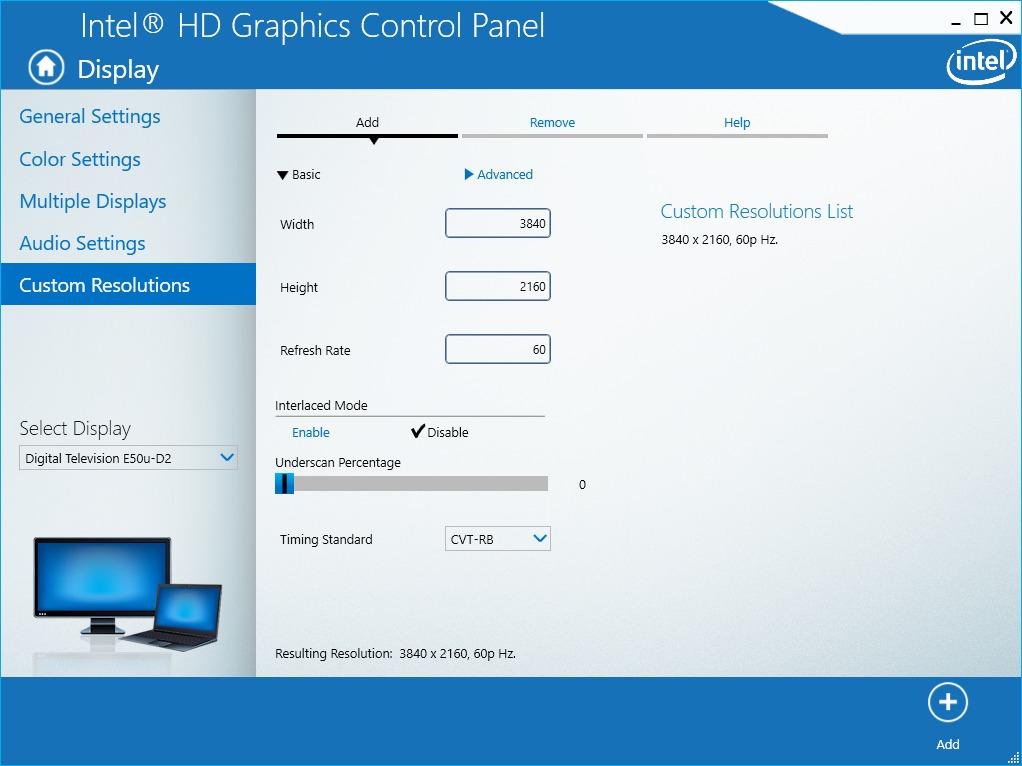
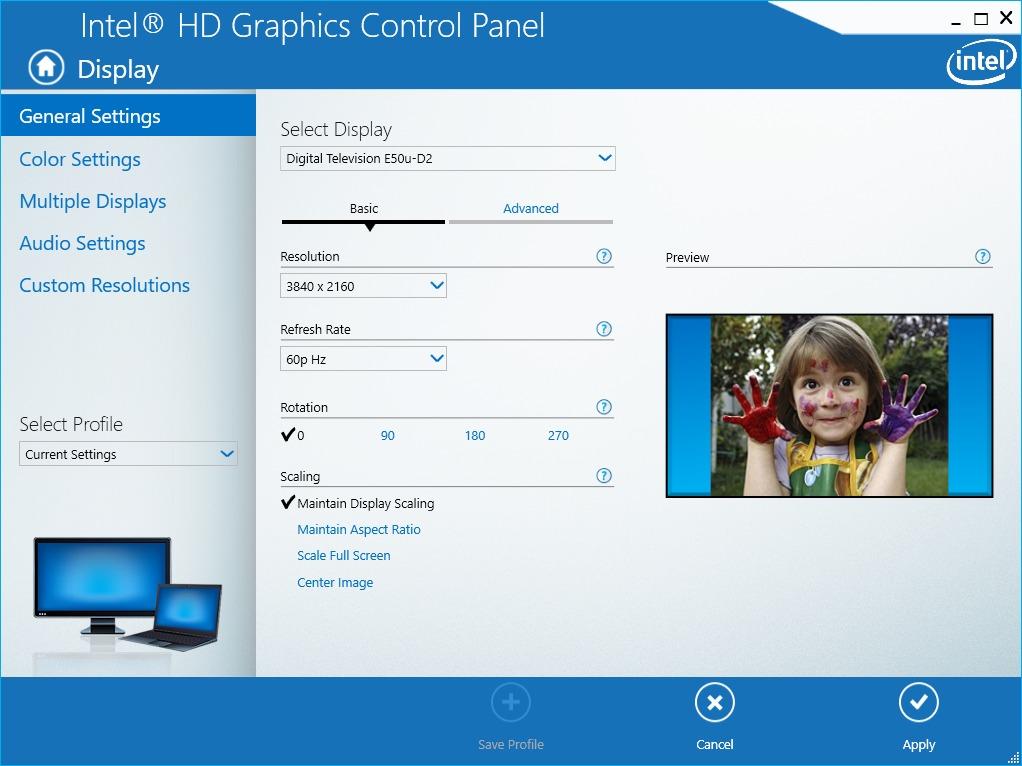
Excellent product and works as advertised, but it took some finessing on my part. If you're like me and running a haswell i7 with 4600 graphics (or similar cpu) on a windows based laptop, this adapter will not work out of the box for you. Step one is too make sure you're using the proper hmdi 2.0 port on your monitor/tv. (mine is hdmi 1 port on my vizio tv). Then you'll want to 'search for updates' for your intel graphics. After that open the Intel HD Graphics control panel. > go to display > custom resolutions > set the width to "3840" and the height to "2160" and refresh rate to "60" (**make sure the correct display is selected in the display drop-down menu on the left hand side**) > next you'll want to set the 'Timing Standard' to CTV-RB (VERY IMPORTANT) > finally click add and go back to general settings. Select the resolution you just entered and the refresh rate should be available. I hope this helps!
I recently got an 8k TV for programming and productivity (HIGHLY RECOMMEND)... My 1660 Super on my work PC only has HDMI 2.0b, which only supports 8k 30Hz, which is painful to use.1660 Super also has DP1.4a ports, which carry much higher bandwidth. I was highly skeptical this would work as this was only one of two converters I could find on Amazon to do DP1.4a to HDMI 2.1.I plugged it in, and after restarting my PC it instantly worked with my TV. Native 8k resolution at 60 Hz. Incredible. AND I was surprised to find it allowed for a higher colorspace as well due to the higher bandwidth, so the picture overall looks better than it did before, on top of getting 60 Hz instead of 30 Hz.Thanks for a great product, does exactly what it says it would do.

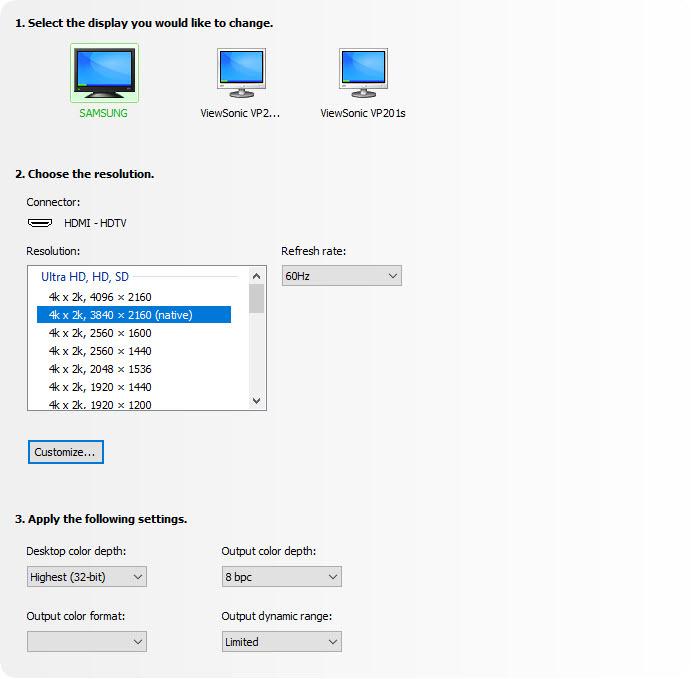
I am a professional software developer and I need a large desktop. I currently utilize a 40" Samsung curved UHD TV with two additional 24" monitors in portrait mode (one on the left and one on the right of the Samsung.) My graphics card is an EVGA 960 with 4GB. This card has 3 DisplayPort outputs and 1 HDMI output. Previously I was using the HDMI output of the graphics card to drive the Samsung TV. This worked well (UHD at 60 Hz) but I was unhappy with the arrangement because the computer would always post to one of the smaller screens when booting up.This adapter allows me to use my Samsung TV as the primary display with one of the DisplayPort outputs. (4K UHD at 60 Hz). See the screenshot I have attached to this review.Note: As an experiment I tried several inputs on the TV. One of the ports is labelled "HDMI 1 / DVI". This input appears to provide more performance than the other HDMI inputs on the TV. For example, this input allows the video card to provide 4K (with RGB, YCbCR 4:4:4, YCbCR 4:2:2 or YCbCR 4:2:0) and 32-bit color with 8 bpc. The other inputs on the TV do not appear support all of the output color formats. BUT... I personally do not LIKE the way the HDMI 1 / DVI input "looks". I can detect digital "shadows" adjacent to lines and fonts. And the display seems "harsh".
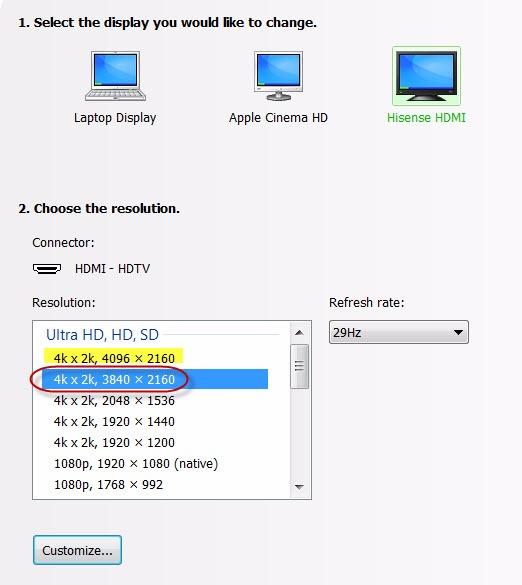
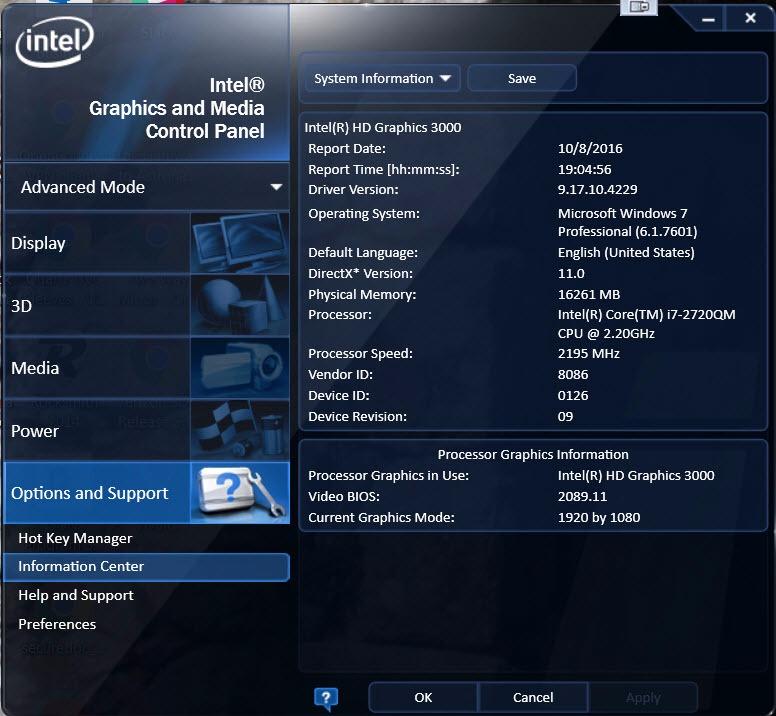
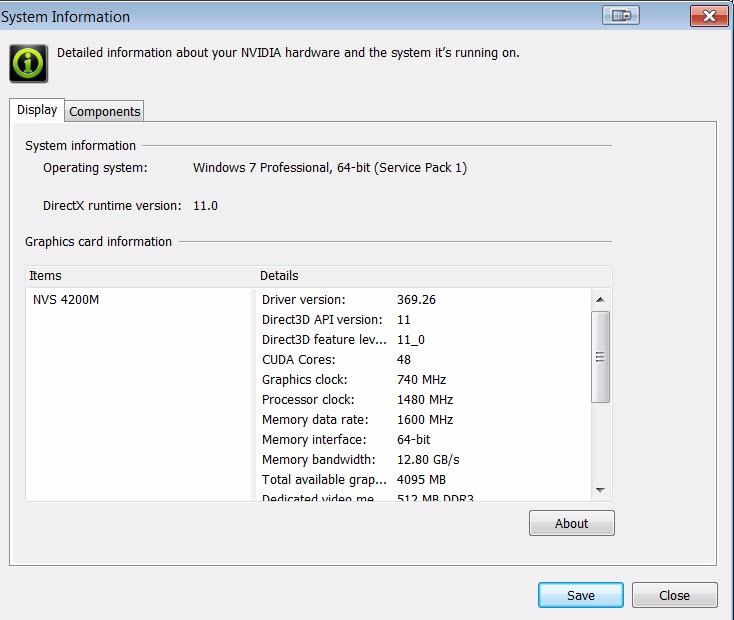
Excellent product, plug & play operation for my setup and enables the 4K resolutions as standard, no custom configurations required.I purchased the DisplayPort 1.2 to HDMI 2.0a Active adapter to see if it performed better than the older DisplayPort to HDMI Passive adapter I had on hand with a recently purchased 50" flat panel. While the DP-HDMI passive adapter allowed me to display 3840x2160 resolution, I had to create a custom resolution for the NVIDIA GPU. After each reboot, and often after unlocking the screen saver, the custom setting and passive adapter combination would disable the 4K monitor and revert to the base 1920x1080 resolution, requiring multiple time consuming steps to re-enable the 4K monitor. I deemed the custom resolution configuration as the root cause of the instability since using a 40" 4K monitor with the same DP 1.2 port did not result in the same challenges.To satisfy my curiosity I purchased the Uptab adapter, fully expecting that the results would be the same as with the passive adapter.First I tested the Uptab DisplayPort 1.2 to HDMI 2.0a Active adapter with the 40" Seiki SM40UMP that I have been using with a single DP 1.2 connection @ 4K resolution, swapping the DP 1.2 cable with the adapter and a Redmere 18+ Gbps HDMI cable. As expected, the Seiki immediately switched to HDMI and resumed displaying 4K @ 30Hz*.I powered down, switched monitors and connected the Redmere HDMI cable to the 50" monitor using one of the two 4K@60Hz rated ports. After starting back up I was pleasantly surprised when the computer immediately recognized the 50" monitor as with 3840x2160 resolution, requiring no custom resolution configuration. Even more surprising, is that the Uptab DisplayPort 1.2 to HDMI 2.0a Active adapter exposed an undocumented *second* 4K resolution of 4096x2160 @ 24 Hz on the 50" monitor panel! Of course, I tested the 4096x2160 "true 4K" resolution and it works without issue --- Easter Egg in a monitor!Regardless, I switched back to the 3840x2160 resolution to continue testing the stability of the configuration over the next several days. Using the 4096x2160 resolution added a variable and if instability issues resurfaced, would leave me wondering if the root cause was the adapter/monitor combination or the 4096/adapter/monitor combination.My configuration is:Dell Latitude E6520 i7-2720HQM with Intel HD 3000 IGU**NVIDIA NVS 4200M GPU with 512 MB dedicated video memory**Samsung 1TB 850 EVO SSD; 2TB Seagate ST2000LM00716 GB DDR3 1866 Mhz ramDell PR02X E-Port II Plus Docking Station (supplying the 2x DisplayPort/DVI-D ports)- screen shots attached*My current computer configuration will not support 4K@60Hz from a single DP 1.2 port, therefore I cannot test the full HDMI 2.0a 60Hz capabilities of the adapter.**Before anyone points out the fact that the Intel HD 3000 and NVIDIA NVS 4200M GPUs have a documented maximum resolution of 2560x1600, you are absolutely correct --- and I was planning to purchase two 27" 2560x1440 monitors to replace the two 27" 1920x1200 monitors that were failing after 8 years of constant use based on the Dell and Intel documentation. I already had the 50" monitor and decided to see how it would look at the 2560x1440 resolution which led to the discovery that the E6520+Docking Station combination would drive a 4K resolution from a single DP port.Just as Dell's documentation states that the E6520 can only support 8 GB of 1333 MHz ram, it is a well known fact that Dell usually understates the full capacity of the on-board chipset. I've been running 16 GB of 1866 MHz DDR3 ram (2x8 GB DDR3 SODIMM) since mid-2013 without issue and have been watching the prices of the 32 GB 1600 MHz DDR3 SODIMM kits(2x16 GB DDR3 SODIMM) for the past year to see if I can access the full capacity of the Intel chipset in the notebook.
Alt virket som normalt da jeg koblet til.
First let me say that the product is working perfectly but there is a backstory to this.
I originally bought this in October of 2021 and was disappointed that it was only passing a 4:2:0 signal from my 6900xt to my LG C1 and had intended to return it (even received an RMA). I changed my mind on the hope that it was a firmware issue that would be resolved as a support e-mail had said the issue may be with LG OLEDs at that time.
Well, I don't know which firmware did it but I decided to try this again tonight on a whim and it works great.
This was a perfect solution to get 2160p/60 from my computer to the TV. Very easy to use. The computer automatically recognized the correct screen resolution. The only possible concern I can think of is that the adapter doesn't support HDR (most don't as of the time of this review).
I have heard that these adapters are sometimes hit-or-miss, and I have went through a few unsuccessful solutions. Works as advertised. I have a Sony XBR-65X900C(60Hz), and there was a several second delay when turning on the PC, where there was no picture, but after the delay, I had my 4K going with my PC, using a Nvidia GTX 1080(Founders Edition). No complaints.
Need to update the bios asap or it gets too hot to touch.
Excellent product. Arrived in excellent condition and worked as expected. Seller has been corteous and very professional to help on every detail, including a set of instructions sent in advance by email, in order to make sure everything was ok. If needed, I will for sure buy again from Uptab. Thank you and greetings from Brazil !
Still an early review. Connected my Dektop with GTX 1080 FTW display port 1.4 to my Samsung UN65KS8500 TV HDMI 2.0a port. Did not work. As soon as I connect, my TV stops detecting any source as if the converted is not transmitting anything and the primary display of my computer goes dark like 'stand by'. I have not given up hope yet, will try my laptop with TV and may be read up online for solutions before I give up and send it back.
This is a true display port to HDMI 2.0 converter. Playing doom 4k @ 60hz on my big screen was awesome. My Samsung UHD TV doesn't have a display port and my gtx 780 doesn't have HDMI 2.0 so this way I could convert the signal with no loss or detectable lag. Thanks for the quality product!Highly recommended
Works good, but had to do a lot of fiddling to get it to work properly, but so far so good after a month of usuage
This adapter works perfectly on my my LG wide monitor running at 2560x1080. I'm now free of my Display Port hot plug auto detect issues, a feature of display port that would cause the monitor to disappear from Windows anytime the monitor was turned off, messing up my tri-monitor configuration and icon locations. Highly annoying. I'm so happy I never have to deal with that again.
it does give 4K at 60 but they claimed it supports YCbCr4:4:4, 4:2:2 and 4:2:0 up to 12 bpc , and its the only reason i bought it for and on my AMD card they option was grayed out so its of no use to me
Kostenloser Versand über $50
Versand am selben Tag für die meisten Bestellungen